3D Scanner
Faites le tour d'une pièce avec votre iPhone Pro : 3D Scanner transforme la capture LiDAR en plan 2D coté et en modèle 3D, consultables sur Mac et partageables avec n'importe quelle application 2D ou 3D via iCloud Drive.Walk around a room with your iPhone Pro: 3D Scanner turns the LiDAR capture into a dimensioned 2D floor plan and a 3D model, viewable on the Mac and shareable with any 2D or 3D app through iCloud Drive.拿着 iPhone Pro 在房间里走一圈:3D Scanner 将 LiDAR 采集转换为带尺寸的 2D 平面图和 3D 模型,可在 Mac 上查看,并通过 iCloud Drive 分享给任意 2D 或 3D 应用。
Ce que fait 3D ScannerWhat 3D Scanner does3D Scanner 的功能
Scan LiDAR guidéGuided LiDAR scan引导式 LiDAR 扫描
La capture RoomPlan d'Apple détecte murs, portes, fenêtres et meubles pendant que vous marchez. La pièce est nommée automatiquement (Salon, Chambre…).Apple's RoomPlan capture detects walls, doors, windows and furniture as you walk. The room is named automatically (Living room, Bedroom…).Apple 的 RoomPlan 采集会在你走动时识别墙面、门、窗和家具,并自动为房间命名(客厅、卧室……)。
Plan 2D cotéDimensioned 2D plan带尺寸的 2D 平面图
Murs, portes et fenêtres cotés en centimètres, surface en m², périmètre et hauteur sous plafond, avec un indice de confiance par élément.Walls, doors and windows dimensioned in centimetres, floor area in m², perimeter and ceiling height, with a confidence indicator per element.墙、门、窗均以厘米标注尺寸,并给出面积(m²)、周长和层高,每个元素附有置信度指示。
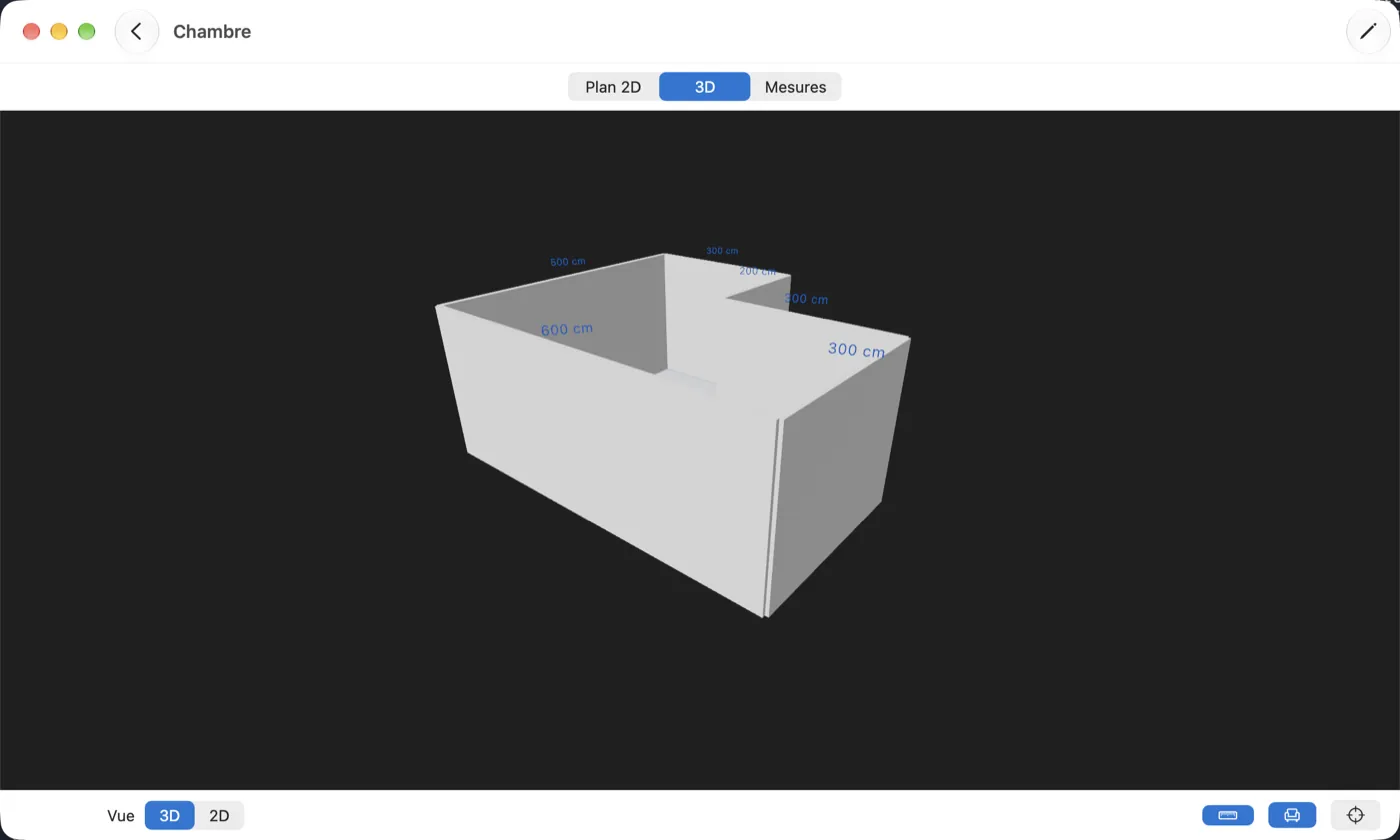
Visualiseur 3D, 2D et AR3D, 2D and AR viewer3D、2D 与 AR 查看器
Orbite 3D, vue de dessus 2D, et réalité augmentée sur iPhone : maquette à l'échelle sur une table ou superposition 1:1 dans la vraie pièce.3D orbit, 2D top-down view, and augmented reality on iPhone: a scale model on a table or a 1:1 overlay in the real room.3D 环绕、2D 俯视,以及 iPhone 上的增强现实:在桌上放置比例模型,或 1:1 叠加到真实房间。
Exports pour tous les outilsExports for every tool适配各类工具的导出
2D : PDF, PNG, SVG, DXF R12. 3D : USDZ, OBJ, STL, PLY. Données : JSON, et un ZIP de l'ensemble. Partage par AirDrop, Fichiers, Mail ou toute app installée.2D: PDF, PNG, SVG, DXF R12. 3D: USDZ, OBJ, STL, PLY. Data: JSON, plus a ZIP of everything. Share via AirDrop, Files, Mail or any installed app.2D:PDF、PNG、SVG、DXF R12。3D:USDZ、OBJ、STL、PLY。数据:JSON,另有全部内容的 ZIP。可通过 AirDrop、“文件”、邮件或任何已安装的应用分享。
iCloud Drive comme passerelleiCloud Drive as the bridge以 iCloud Drive 为桥梁
Les pièces se synchronisent entre iPhone et Mac et un dossier « 3D Scanner » apparaît dans Fichiers et le Finder. Repli sur le stockage local sans compte iCloud.Rooms sync between iPhone and Mac, and a “3D Scanner” folder shows up in Files and Finder. Falls back to local storage without an iCloud account.房间在 iPhone 与 Mac 之间同步,“文件”和 Finder 中会出现“3D Scanner”文件夹。没有 iCloud 账户时回退到本地存储。
Compagnon MacMac companionMac 伴侣应用
Même code, app Mac native : bibliothèque en barre latérale, plan, modèle 3D et mesures sur grand écran, export (⌘E), impression (⌘P) et glisser-déposer vers vos autres outils.Same codebase, native Mac app: sidebar library, plan, 3D model and measurements on the big screen, export (⌘E), print (⌘P) and drag and drop into your other tools.同一套代码的原生 Mac 应用:侧边栏资料库,大屏上查看平面图、3D 模型和测量数据,支持导出 (⌘E)、打印 (⌘P),并可拖放到其他工具中。
Installer 3D ScannerInstall 3D Scanner安装 3D Scanner
L'app Mac se télécharge en .dmg depuis les Releases GitHub (signé Developer ID, notarisé, mise à jour automatique par Sparkle). Elle nécessite macOS 15 ou ultérieur. L'app iPhone n'est pas distribuée sur l'App Store : on la compile et on la lance depuis Xcode ; le scan exige un iPhone Pro avec LiDAR (iOS 18 ou ultérieur). Open source (MIT).The Mac app is a .dmg download from GitHub Releases (Developer ID-signed, notarized, auto-updating with Sparkle). It requires macOS 15 or later. The iPhone app is not distributed on the App Store: you build and run it from Xcode; scanning requires an iPhone Pro with LiDAR (iOS 18 or later). Open source (MIT).Mac 应用可从 GitHub Releases 下载 .dmg(Developer ID 签名、已公证,通过 Sparkle 自动更新),需要 macOS 15 或更高版本。iPhone 应用未在 App Store 上架:需通过 Xcode 编译并运行;扫描需要配备 LiDAR 的 iPhone Pro(iOS 18 或更高版本)。开源(MIT)。